> For the complete documentation index, see [llms.txt](https://docs.openalgo.in/llms.txt). Markdown versions of documentation pages are available by appending `.md` to page URLs; this page is available as [Markdown](https://docs.openalgo.in/new-features/action-center.md).
# Action Center
### What is Action Center?
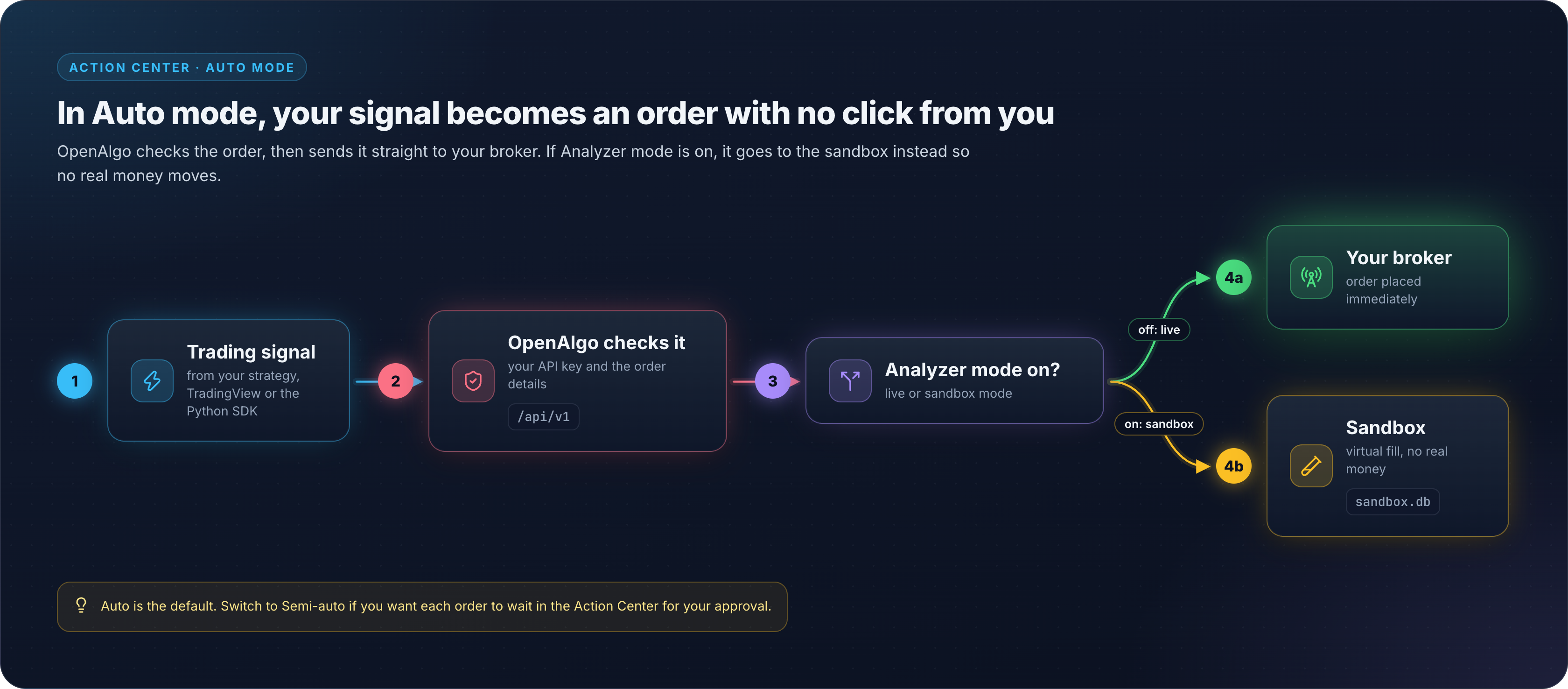
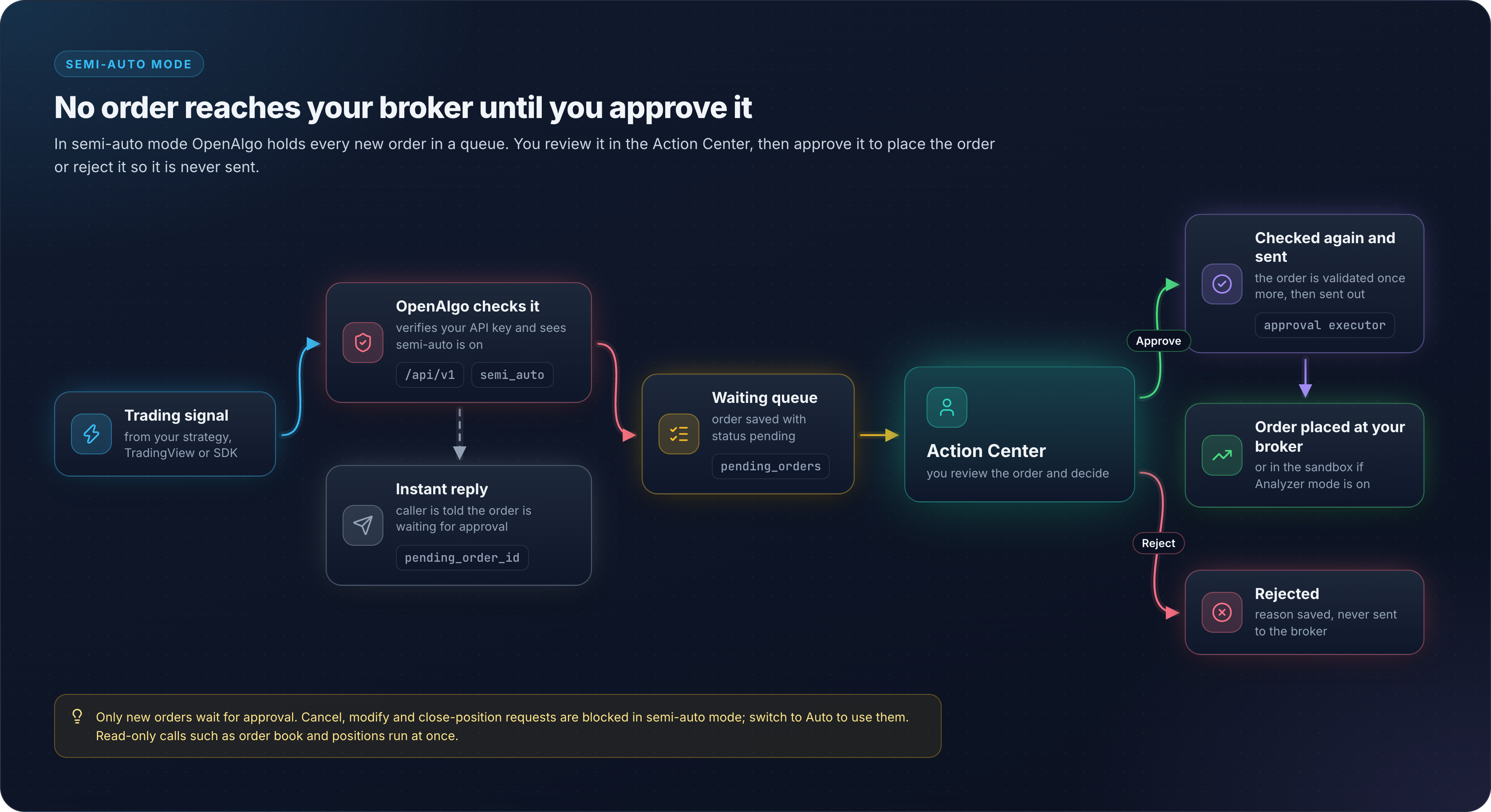
**Action Center** is an approval queue for eligible live order requests in semi-auto mode. Supported queued orders wait for review before the approval executor sends them to the broker.
Think of it as a **safety checkpoint** between your trading strategy and your real money.
### Why Would You Use It?
#### Real-World Examples
**Example 1: Testing a New Strategy**
* You wrote a Python trading bot that generates buy/sell signals
* You're not 100% confident it works correctly yet
* Instead of letting it trade automatically, you enable Action Center
* Now every order waits for your approval - you can catch mistakes before they cost you money
**Example 2: High-Risk Trades**
* Your strategy generates a signal to buy 1000 shares of a volatile stock
* You want to review the order before it executes
* Action Center lets you verify quantity, price, and timing before confirming
**Example 3: Learning and Monitoring**
* You want to understand what signals your strategy is generating
* Action Center shows you every order before execution
* Great for learning how your algorithm behaves in real market conditions
### How It Works
#### Two Modes
**1. Auto Mode (Default) - Fully Automated**
Orders execute immediately without any manual intervention.
**2. Semi-Auto Mode - Manual Approval Required**
Orders wait in Action Center for you to review and approve.
### Step-by-Step Setup
#### Step 1: Enable Semi-Auto Mode
1. Go to **Profile** → **API Key** page
2. Find **"Order Execution Mode"** section
3. Turn ON the toggle switch (it will turn orange)
4. Status changes from "Auto Mode" to "Semi-Auto Mode"
#### Step 2: Send Orders from Your Strategy
Your Python code stays exactly the same:
```python
api.placeorder({
"apikey": "YOUR_API_KEY",
"symbol": "SBIN",
"action": "BUY",
"quantity": "10"
})
```
But now the response will be different:
```json
{
"status": "success",
"message": "Order queued for approval in Action Center",
"mode": "semi_auto"
}
```
#### Step 3: Review Orders in Action Center
1. Click **"Action Center"** in the main menu
2. You'll see a badge showing how many orders are pending
3. Click on "Pending" tab to see orders waiting for approval
#### Step 4: Approve or Reject
For each order, you can:
* **Approve**: Click green "Approve" button → Order sends to broker
* **Reject**: Click red "Reject" button → Order cancelled, never sent to broker
### What You Can See in Action Center
For each pending order:
* **Symbol** (e.g., "SBIN")
* **Action** (BUY or SELL)
* **Quantity** (e.g., 10 shares)
* **Price** (e.g., ₹625.50)
* **Order Type** (MARKET, LIMIT, etc.)
* **When it was created** (e.g., "2 minutes ago")
* **Current status** (Pending, Approved, Rejected)
### Tabs in Action Center
1. **Pending** - Orders waiting for your action
2. **Approved** - Orders you approved and sent to broker
3. **Rejected** - Orders you declined
4. **All Orders** - Complete history
An **Approve All** control clears the whole pending queue in one action, and a pending row can also be deleted outright rather than approved or rejected. A count endpoint drives the badge in the navigation bar.
### Special Features
#### Auto-Refresh
Socket.IO events refresh the list when pending orders are created or updated. A manual refresh control is also available.
#### Statistics Dashboard
At the top, you see:
* Pending Approval: 5 orders
* Buy Orders: 3
* Sell Orders: 2
* Approved: 15
* Rejected: 2
#### Audit Trail
Every action is logged:
* Who approved/rejected
* When it was approved/rejected
* Rejection reason (if you provide one)
### Common Questions
#### Q: Do I need to change my trading code?
**A:** No! Your API calls stay exactly the same. Just toggle the mode in settings.
#### Q: What happens if I don't approve/reject orders?
**A:** They stay in the Pending queue indefinitely. Your strategy will keep generating signals, but they won't execute until you approve.
#### Q: Can I switch back to Auto Mode anytime?
**A:** Yes! Just toggle the switch OFF in API Key settings. New orders will execute immediately again.
#### Q: Which order types can the approval executor dispatch?
**A:** The approval executor dispatches seven order types:
* Regular orders (`placeorder`)
* Smart orders (`placesmartorder`)
* Basket orders (`basketorder`)
* Split orders (`splitorder`)
* Options orders (`optionsorder`)
* Multi-leg options orders (`optionsmultiorder`)
* GTT orders (`placegttorder`)
Everything else bypasses the queue. Order status, order book, trade book, positions, holdings, funds, open position, and the GTT order book always execute immediately because they only read. Close-position, close-all-positions, cancel, cancel-all, modify, modify-GTT, and cancel-GTT are refused with HTTP 403 in semi-auto live mode: switch back to Auto mode to use them. Cancelling or modifying a GTT is deliberately excluded from the queue because a queued action against a GTT that has already triggered is unsafe.
#### Q: Can I see which orders my strategy generated vs which I approved?
**A:** Yes! Each order shows:
* Created time (when strategy sent it)
* Approved time (when you clicked Approve)
* Broker order ID (after execution)
### Quick Comparison
| Feature | Auto Mode | Semi-Auto Mode |
| -------------------- | --------------------- | ------------------------ |
| **Order Execution** | Immediate | After approval |
| **Your Involvement** | None | Review each order |
| **Safety** | High risk (no checks) | Low risk (manual review) |
| **Speed** | Very fast | Slower (manual) |
| **Best For** | Proven strategies | Testing, learning |
### When to Use Which Mode
#### Use Auto Mode When:
* Your strategy is proven and tested
* You need high-frequency trading
* You trust the strategy 100%
* Speed is critical
#### Use Semi-Auto Mode When:
* Testing a new strategy
* Learning algorithmic trading
* High-risk trades need verification
* You want full control over every order
### Example Workflow
**Scenario**: You're testing a new momentum strategy
1. **Morning 9:00 AM**
* Enable Semi-Auto mode in settings
* Start your Python trading bot
2. **9:30 AM** - Market opens
* Your bot generates BUY signal for RELIANCE
* Order appears in Action Center "Pending" tab
3. **9:31 AM** - You review
* Symbol: RELIANCE (correct)
* Quantity: 10 (looks right)
* Price: ₹2,500 (reasonable)
* Click "Approve"
4. **9:31 AM** - Order executes
* Sent to broker
* Shows "Approved" status
* Broker order ID: 240612000123456
5. **10:00 AM** - Another signal
* Your bot wants to SELL 100 shares of INFY
* Wait... 100 shares seems too much!
* Click "Reject" with reason: "Quantity too large"
6. **End of Day**
* Review statistics: 10 approved, 2 rejected
* Adjust your strategy code to fix the quantity issue
### Tips for Success
1. **Start with Semi-Auto** when testing new strategies
2. **Switch to Auto** only when you're confident
3. **Monitor the Pending tab** regularly (it auto-refreshes)
4. **Use rejection reasons** to track why you rejected orders
5. **Review history** in "All Orders" tab to learn from patterns
###
***
**Remember**: Action Center gives you control. Use it wisely to protect your capital while testing new strategies!